Total Pageviews

Saturday, 2 February 2013

Apple Overtakes Samsung as Top U.S. Mobile-Phone Vendor

Iphone-patent

Apple has become the leading U.S. mobile-phone vendor for the first time last quarter, securing a record 34% of market share, and knocking rival Samsung off the top spot.
The Cupertino, Calif., company shipped 17.7 million phones during the fourth quarter, growing 4% annually, according to a new report by research firm Strategy Analytics. For comparison; that number jumped from 12.8 million in the fourth quarter of 2011, when Apple captured 25% of the market.
"Apple's success has been driven by its popular ecosystem of iPhones and App Store, generous carrier subsidies, and extensive marketing around the new iPhone 5 model," the report said.
Samsung took second place in the last quarter of 2012, shipping 16.8 million phones for 32% market share. The Korean electronics giant had been the top mobile-phone vendor in the U.S. since 2008, but failed to fight Apple off despite what Strategy Analytics called a "good performance."
Taking the third spot, LG shipped 4.7 million phones for 9% share.
Overall, mobile-phone shipments grew 4% annually to 52 million in the fourth quarter of 2012 from 50.2 million in the fourth quarter of 2011, according to Strategy Analytics.
"Growth was driven by robust demand among consumers for 4G smartphones and 3G feature phones."
This boost, however, is tempered by the fact that the U.S. mobile-phone market had shrunk during the first three quarters of 2012 due to "economic uncertainty and tighter carrier upgrade policies," the report added, saying that shipments fell 11% from 186.8 million phones in 2011 to 166.9 million in 2012.
What is your preferred mobile-phone brand? Tell us in the comments, below.


Pebble Smart Watch

Pebble-wrist

As promised at CES 2013, the Pebble smart watch starts shipping Wednesday.
Pebble is the most successful Kickstarter project of all time, raising more than $10 million from nearly 70,000 backers. The watch works in conjunction with your smartphone, making it easy to see who is calling, control your music and receive notifications. Even better, app developers can build Pebble support into their apps, extending the watch's capabilities even more.
 the Pebble team shared the latest status on shipping and mass production.
Pebble says that while it is working on adding shipment tracking to its account fulfillment page, it isn't there yet. Therefore, the company implores users not to start emailing about shipment tracking.
Today, less than 500 units will be shipped out from the factory, with more units to follow soon. Pebble has created a humorous IsPebbleShipping.com website to keep users connected.
On the app front, the Pebble Android app will be live in Google Play on Jan. 24. The iOS app is still in review. If users get Pebble before the app hits the App Store, they'll still be able to receive notifications and music, but they won't be able to upgrade the PebbleOS or install watch faces.
As one of the backers, I can't wait to get my hands on Pebble (no pun intended). Are you excited about the Pebble? Let us know in the comments.
for more :-  moderntrick


Microsoft Office 2013 for Windows 8

Office 2013 Review

Start
As of today, Microsoft Office 2013 for consumers is available in 162 markets in 21 languages for either a $99.95 yearly subscription. The subscription lets you install Office on up to five devices (PCs, Macs or a mix), comes with 60 Skype minutes per month and 20GB of SkyDrive storage, and entitles you to continual updates to the apps for as long as you subscribe.
You can still buy the new Office for the one-time cost of $219.99, but that only lets you install it on one machine, and you don't get the version updates. Office 365 University for college students and staff is also available for a $79.99 yearly subscription. The business version of Office, which is priced a bit higher and includes deeper integration with Microsoft's enterprise software, won't arrive until Feb. 27.
Today, only the Windows apps are getting a refresh. The Mac apps are still the 2011 versions, and don't have the new features in Office 2013 — cloud collaboration for instance, can only be done via the Office web apps. The Mac version of a major Office update typically lags the Windows one by several months, but it often gets a few extras when it finally arrives.

Cloud Productivity

The most powerful change to Office in the new edition is that it's made with connectivity in mind.
The most powerful change to Office in the new edition is that it's made with connectivity in mind. It starts with how you get it: No longer do you need to go to a store and buy a package with a disc inside (though you still can) — a purchase gets you product code. Enter the code, and you're taken to an account screen where you can download the Office apps and manage your Skype minutes storage, and authorize (or de-authorize) your five devices running the software. It's all very logical.
Downloading the apps takes a little while (it took my Samsung Series 7 tablet about 15 minutes), but you can start using them sooner than that. I fired up Word and began typing my notes for this review just a couple of minutes into the download.
Connection to the cloud — mainly via Microsoft's SkyDrive cloud service — is a constant presence in the new Office. Once you've connected your account, the default save location is SkyDrive, which also enables sharing and collaborating with others.
Save to SkyDrive
Microsoft was already using the cloud with Office 365, of course, but now the integration goes deeper. You can work on a SkyDrive document within the native Word app, for instance (as opposed to the browser), and it will even indicate if anyone else is editing the document at the time. If you want to ask what they're doing, it's easy to initiate an IM, call or Skype them without leaving the app.
The way Office 2013 works with the cloud is excellent, though I had a couple of issues with it: Word still needs any edits to be manually saved before they show up for other collaborators. It's a stark change for anyone used to Google Drive's real-time edits that just magically appear.
Second — and this is a greater problem — I found editing in Word noticeably slows down when working on a SkyDrive-stored document, even when no one else was working on it. It's not a lot, but it's enough to just default to saving locally. Of course, that eliminates the possibility of collaboration and other advantages.
Generally, though, greater connectivity was a needed upgrade for Office, and I hope Microsoft continues to improve it. Now it's possible to, say, insert a YouTube video into a Word document. Excel tables can be populated with real-time data. PowerPoint has slide templates that are continually updated via the Internet.

New and Improved Word

The apps that constitute Office have evolved over the years, but the core is still Word, Excel and PowerPoint. All of them have a new Spartan look that eschews the old toolbars for a revamped navigation across the top. Things like File, Home, Insert and View are all there, and tapping (or clicking) on one calls up a ribbon of clearly labeled icons. It's all very neat.
If you've ever tried to insert something like a photo into a Word doc, you know why page-layout apps like Adobe InDesign exist. Word 2013 does inserts better than any previous version, though, adjusting text wraps in real time as you move your object (be it photo, clip art or video). Options for inserting online images and videos are right in the menus.
One of the best changes in Word 2013 is the rethink of Track Changes.
One of the best changes in Word 2013 is the rethink of Track Changes. Editors know this function well, and many secretly dread the way it turns documents into strikethrough-laden mush with comments pop-ups everywhere. The new Word gives you an easy way to remove the markings from view while simultaneously consolidating those pop-up conversations.
Even better, you can now protect documents with a password, ensuring users can't make changes outside of using Track Changes. If you're used to the old way the feature worked, it's a little panicky when you make your first change and don't see the familiar strikethrough, but the mess is now under control.
Finally, a lifesaver: Word can now also edit PDFs, just like you would any other document. When you're done, you have the option to save as a PDF or a Word doc.

Excel and PowerPoint Rise

Excel's new big "wow" feature is Flash Fill. In the "tour," the app takes a table full of email addresses, formatted "firstname.lastname@wherever.com," and invites you to create a new column with just the first names. Start typing the first one, nothing happens. Start typing the second, and Excel figures out what you're doing and automatically fills out the rest of the column. The first time this happens, you might actually cheer.
However, it's a situation that I had a hard time replicating, usefulness-wise. This could be just me, but most of my tables I have don't have similarly formatted data, ripe for extrapolated partitioning. Still, it could save loads of time if you're doing a data "cleanup" — say getting contact information out of an old address book.
Far more useful, I think, are Excel's Suggested Charts and Instant Analysis. Got data? Excel can suggest several different kinds of tables that will be appropriate for it. I found its choices, like the chart below, to be very good, generally, needing only style adjustments and proper titles to make them truly pretty. It's a bit humbling when an app has better instinct than you, but I've never claimed to be a chart guy.
Recommended Chart
Instant Analysis is a great tool: Highlight your table and it can tell you which data points are the top performers, which fall below a certain threshold or what the totals are when each column is summed. It can even create temporary mini charts on the fly.
PowerPoint's best new feature is Presenter View. This is a feature that already exists in other apps like Apple's Keynote, and Microsoft has done a good job building this for touch. When you connect your PC to an external monitor, Presenter View shows you a screen with the miniaturized slide along with your own notes and the time elapsed. You can use gestures to enlarge things or jump (just yourself) ahead in the presentation.

New Office Rules

These are just a few of the highlights of Office 2013, but they give you a feel of the direction Microsoft is heading in. Office has been a the go-to suite for core productivity apps for going on two decades, but it's overall experience felt tired and inflexible in the world of real-time collaboration with services such as Google Apps, Dropbox and OpenOffice.
With Office 2013, Microsoft has caught up with its competitors, but it hasn't surpassed them.
With Office 2013, Microsoft has caught up with its competitors, but it hasn't surpassed them. It still needs to polish its experience (improving performance while saving to the cloud would be a big help) and make the experience even more inviting. Office certainly still has its edge on features and formatting — and the new layout is pretty — but it still has an intimidation factor.
The reason you should upgrade and get the new version, however, isn't the cloud integration or the cool new features. It's the subscription model. Spending $99.95 a year on a suite of world-class productivity apps that you can install on five machines — complete with cloud integration and continual updates — is simply a good deal.
Yes, you can arguably have Google Apps on an unlimited number of machines for free, but if you're like me, you'll at one point or another long for a Word formatting option or Excel pivot table. Although Microsoft's cloud integration isn't as good as Google's, you'll also never have the frustration of not being able to work because the connection to the server was "too busy." If you've ever felt adrift in the cloud, at the mercy of the changing winds of the Internet, Office 2013 will keep you safely tethered to the ground.
Samarthkannan

Saturday, 10 November 2012

Free iPad App Helps Train Future Neurosurgeons


The neurosurgeons of tomorrow can hone some of the necessary skills on the iPad, thanks to a new training app called VCath.

Developed by Bangor University in the U.K, the free iPad app helps neurosurgeons-in-training master an appreciation of the ventricular system in the brain.

The VCath app is designed to take a neurosurgical trainee through the steps of positioning and inserting a catheter into the brain of a virtual 3D patient. These steps are part of a procedure called “Ventricular Catheterisation,” which is used to drain fluid that has become obstructed within the ventricles of the brain.

Inserting a catheter at the correct orientation and depth so that it punctures the ventricles is critical to a successful outcome for the patient, notes VCath’s developer. It requires the neurosurgeon to have an excellent 3D awareness as the anatomy involved is not visible during the procedure.

“VCath is an exciting new iPad application which allows trainees to learn the basic theoretical and practical skills of ventricular catheterisation in a realistic simulated environment,” said William Gray, professor of Functional Neurosurgery at the Institute of Psychological Medicine and Clinical Neurosciences, Cardiff University.

“It is a valuable tool for enhancing the learning of a core skill set and is a significant advance for applying simulation to neurosurgical training.”


Monday, 29 October 2012

SMART PHONE BOOK


Ilshat Garipov by Russian designer to visualize the future, smart phones (smart phones booklet) Folding type mobile phone book brought inspiration from the book.the same function alone as an independent player in a separate page, the page can be. Music, video, photos, etc. All information is stored in the cloud server, so help is only a carrier, if you wear the phone book, easy transfer of information and set up a new blank phone book amount of wear from recycled and biodegradable be.
Is so powerful, so attractive the face of mobile phones, said that even if we imagine it, where to buy many of my friends I'm afraid to ask? Designers responded: So, you can buy anything. But the concept does not mean impossible, it is envisaged in the phone book "smart" nanoparticles will use the production, and energy is vibration your pocket or sun, and the temperature of this particular material Learning in the field of intensive research by scientists in the near future could make this concept.

EMPEROR 200 LUXURY COMPUTER WORKSTATION


This over-the-top looking setup gives you a comfy ergonomic leather seating unit with touch-screen controls, and a view to kill with three computer displays positioned just right for you to lean back and enjoy.


The whole thing is motorized too, so you can adjust the angle of your environment without getting up out of your chair. It’s also got a work surface for a keyboard and mouse, and the monitors can be positioned at a flat eye-level if you want to get some work done.


IN 2020 WE CAN WEAR SONY COMPUTERS ON OUR WRIST


Our present need for internet connectivity is so profound that secondary devices like the Nextep Computer are bound to happen. Developed to be worn as a bracelet, this computer concept is constructed out of a flexible OLED touchscreen. Earmarked for the year 2020, features like a holographic projector (for screen), pull-out extra keyboard panels and social networking compatibility, make the concept plausible. Ten years from now is not too far away, so how many of you think we’d be buying such gadgets?

Designer: Hiromi Kiriki
Latest Sony Computers 1
Latest Sony Computers 2
Latest Sony Computers 3
Latest Sony Computers 4
Latest Sony Computers 5
Latest Sony Computers 6
Latest Sony Computers 7
Latest Sony Computers 9
Latest Sony Computers 10

Sunday, 21 October 2012

FTC Offering $50,000 to Anyone Who Can Stop Robocalls


Can you make the robocalls stop? It might be worth $50,000.
The Federal Trade Commission (FTC) yesterday kicked off its FTC Robocall Challenge, which will offer $50,000 to the person or team who can come up with a way to stop annoying, robotic calls.
RobocallThe effort is the first contest hosted on Challenge.gov, an online platform that invites people to submit ideas for how best to solve pressing government challenges.
"The FTC is attacking illegal robocalls on all fronts, and one of the things that we can do as a government agency is to tap into the genius and technical expertise among the public," David Vladeck, director of the FTC's Bureau of Consumer Protection, said in a statement. "We think this will be an effective approach in the case of robocalls because the winner of our challenge will become a national hero."
The FTC will start accepting challenges on Oct. 25 at 5 p.m. Eastern and the submission period will run until Jan. 17 at 5 p.m. Winners will be announced in April.
Judges for the challenge are Steve Bellovin, FTC Chief Technologist, Henning Schulzrinne, Federal Communications Commission Chief Technologist, and Kara Swisher of All Things D. They will give a Best Overall Solution prize to an individual or team of fewer than 10 people based on the following criteria: does it work? (50 percent); can it be rolled out? (25 percent); and is it easy to use? (25 percent).
Teams of more than 10 people can apply for the FTC's Technology Achievement Award, which does not include a cash prize.
For those who have questions, the FTC will host two, one-hour social media chats. The team will be answering questions via its @FTC Twitter feed at 1 p.m. Eastern on Oct. 25, and will switch to Facebook at 2 p.m. For more, see the challenge's official rules and FAQs.
Commercial robocalls deliver recorded sales messages, many of which are deceptive, according to the FTC. In some cases they are illegal under the FTC's 2009 Telemarketing Sales Rule, unless the call recipient has given permission for that business to contact them.
Earlier this week, meanwhile, the Federal Communications Commission adopted rules that ban robocalling equipment from contacting Public Safety Answering Points (PSAPs) - or 911 call centers that receive emergency calls.
"By some estimates, hundreds or even thousands of unwanted robocalls are made to PSAPs each day, tying up public safety phone lines and diverting critical first responder resources away from the provision of emergency services," the FCC said.

iPod Saves Soldiers Life


447422457_9c05466637.jpg
Photos sent back home by ‘Danny’ with this caption:
My wife’s uncle works in a military hospital and told me about this. Its pretty amazing. Kevin Garrad (3rd Infantry Division) was on a street patrol in Iraq (Tikrit I believe) and as he rounded the corner of a building an armed (AK-47) insurgent came from the other side.
The two of them were within just a few feet of each other when they opened fire. The insurgent was killed and Kevin was hit in the left chest where his IPod was in his jacket pocket. It slowed the bullet down enough that it did
Another reason why everyone should have an iPod!
More pictures…

447422483_6517f903b9.jpg


How to Replace your iPhone 3G/3GS Glass, Digitizer and/or LCD


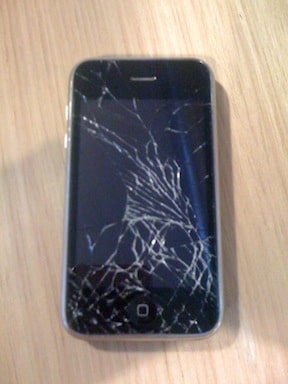
After about 3 years of dropping my iPhone 3G on various occasions, a drop onto the tile floor at Atomic HQ did her in:
I made a trip to the Apple store to talk to one of those certified Genius dudes. Pretty impressive Apple can draw people with such amazingly high IQs to sell their products?!?
Anyways, my genius was actually very helpful, although I found out that to have them fix it, I would have to pay $100, and they would basically replace the entire front assembly (glass, touchscreen, LCD, button, speaker). My other option was to go ahead and take advantage of my upgrade to an iPhone 4, though I know that the iPhone 5 is due out this Fall, and even the Genius was honest enough to point out that it would be best if I could wait. So I started looking for DIY options…
I found the glass and touchscreen together for $2.00 through Amazon! I ordered it, along with a toolkit that gives you the 3 necessary tools to go the surgery for another $1.60. Later I learned that the the glass/touchscreen kit I ordered came with the tools as well, though I wasn’t too saddened that I spent an extra $1.60. I was also told, to my surprise, that according to Apple store policy, I could bring any failed DIY attempts to the store and they would still fix it. Therefore, I decided to take the plunge and try to fix it myself.
I found the video below, which is actually pretty well done, though the guy in the video has done this before, and makes it look a little too easy. Basically, you do the following:
  1. Shut phone off (Duh?!?)
  2. Take the SIM card out (that gives you your phone number and service from your provider)
  3. Take 2 screws out (don’t lose them!)
  4. Use the suction cup provided in the tool kit to pull the glass/lcd assembly out of the phone (be gentle, and watch the video!)
  5. Disconnect the 3 small (delicate) cables
  6. Remove the LCD from the assembly by taking out 6 more screws (keep these separate from the others, due to differing size)
  7. Use a hair dryer or heat gun to soften the adhesive that hold the glass to its frame (on LOW!! more later…)
  8. Clean off the broken bits and pieces of old glass
  9. Use the adhesive sticker provided to attach the new glass
  10. Put it all back together
  11. Done!

NOTES FOR DUMMIES

  • BE PATIENT AND GENTLE!! (my biggest problem)
  • If you are skeptical of your abilities to do the glass replacement, spend the few extra bucks to get the entire cover assembly (below)
  • I failed step 7 by getting too impatient that the adhesive wasn’t getting soft enough, and I used a heat gun for too long, which ended up resulting in melting the little dimple under the home button that rendered it nearly inoperable.
  • I must have not reattached the cable to the LCD fully, and I ended up frying it!!! I had to order a replacement LCD for another $23 (and a new home button assembly for $0.60)
  • If you’re an idiot like me and fry your LCD, the LCD kit you will receive will have a new LCD frame and the LCD itself which comes with an adhesive sticker to attach to the frame.
  • The LCD, if you are replacing it, is very fragile. I was pressing down on it to make sure it was secured to the frame, and I cracked by brand new LCD! In the end, it still works fine, but has a tiny wrinkle in the image which has mostly disappeared (whew!)
All in all, I was surprised how easy the process was, though I would have been a bit more careful in order to avoid the second round of repairs. I especially had fun digging into the guts of the iPhone to see how they jam all that good stuff in there to make it work. If you feel up to the challenge, best of luck! Just BE PATIENT!

GLASS & DIGITIZER (TOUCH SCREEN):


Twitter Delicious Facebook Digg Stumbleupon Favorites More

 
Design by Free WordPress Themes | Bloggerized by Lasantha - Premium Blogger Themes | Walgreens Printable Coupons